sentinel-2 大气校正方法
 免费下载资源
参考文章:
哨兵2号(Sentinel-2)介绍、下载、预处理及批处理_GeoSuper的博客-CSDN博客_哨兵2号
Sentinel-2批量大气校正_基于Sen2Cor_GeoSuper的博客-CSDN博客_sen2cor批量大气校正
sentinel-2数据下载 大气校正 转ENVI格式_乌梅呓声的博客-CSDN博客_snap转envi
sen2cor下载地址: Sen2Cor – STEP
Two different versions of Sen2Cor are available:
Sen2Cor_v2.8 is the latest release supporting Sentinel-2 L1C data generated with the current (14.5) and previous (14.2) Products Specification Document, as input. Sen2Cor_v2.8 release contains new features and improvements respect to Sen2Cor_v2.5.5.
Sen2Cor_v2.5.5 is the previous release and it is needed if the user intends to process old Sentinel-2 L1C data generated with the Products Specification Document older than 14.2 and not reprocessed by ESA.
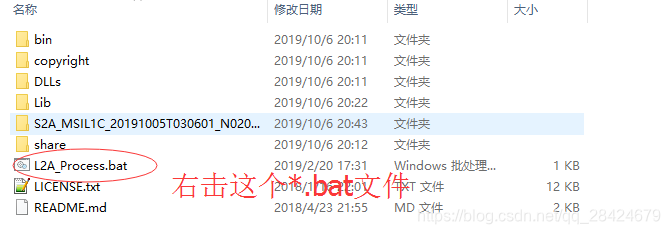
下载zip,解压后进入文件夹,如图。按shift同时右键选择在此处进入命令行。
大气校正后:
大气校正之后可在SNAP进行后续的应用,当然也可以在SNAP里针对特定波段进行导出成tif格式,在其他平台例如erdas、envi中进行操作。
SNAP下载:Download – STEP
| Windows 64-Bit | Windows 32-Bit | Mac OS X | Unix 64-bit | |
| Sentinel Toolboxes | These installers contain the Sentinel-1, Sentinel-2, Sentinel-3Toolboxes | |||
| Download | Download | Download | Download | |
| SMOS Toolbox | These installer contains only the SMOS Toolbox. Download also the Format Conversion Tool (Earth Explorer to NetCDF) and the user manual. |
|||
| Download | Download | Download | Download | |
| All Toolboxes | These installers contain the Sentinel-1, Sentinel-2, Sentinel-3Toolboxes, SMOS and PROBA-V Toolbox | |||
| Download | Download | Download | Download | |
输入L2A_Process.bat –help,得到如下图所示结果即为成功。下一步即可进行大气校正

Microsoft Windows [版本 10.0.14393]
(c) 2016 Microsoft Corporation。保留所有权利。
C:\Users\Administrator>cd Sen2Cor-02.08.00-win64
C:\Users\Administrator\Sen2Cor-02.08.00-win64>L2A_Process --help
usage: L2A_Process.py [-h] [--mode MODE] [--resolution {10,20,60}]
                      [--datastrip DATASTRIP] [--tile TILE]
                      [--output_dir OUTPUT_DIR] [--work_dir WORK_DIR]
                      [--img_database_dir IMG_DATABASE_DIR]
                      [--res_database_dir RES_DATABASE_DIR]
                      [--processing_centre PROCESSING_CENTRE]
                      [--archiving_centre ARCHIVING_CENTRE]
                      [--processing_baseline PROCESSING_BASELINE] [--raw]
                      [--tif] [--sc_only] [--cr_only] [--debug]
                      [--GIP_L2A GIP_L2A] [--GIP_L2A_SC GIP_L2A_SC]
                      [--GIP_L2A_AC GIP_L2A_AC] [--GIP_L2A_PB GIP_L2A_PB]
                      input_dir

Sentinel-2 Level 2A Processor (Sen2Cor). Version: 2.8.0, created: 2019.02.20,
supporting Level-1C product version 14.2 - 14.5.

positional arguments:
  input_dir             Directory of Level-1C input

optional arguments:
  -h, --help            show this help message and exit
  --mode MODE           Mode: generate_datastrip, process_tile
  --resolution {10,20,60}
                        Target resolution, can be 10, 20 or 60m. If omitted,
                        only 20 and 10m resolutions will be processed
  --datastrip DATASTRIP
                        Datastrip folder
  --tile TILE           Tile folder
  --output_dir OUTPUT_DIR
                        Output directory
  --work_dir WORK_DIR   Work directory
  --img_database_dir IMG_DATABASE_DIR
                        Database directory for L1C input images
  --res_database_dir RES_DATABASE_DIR
                        Database directory for results and temporary products
  --processing_centre PROCESSING_CENTRE
                        Processing centre as regex: ^[A-Z_]{4}$, e.g "SGS_"
  --archiving_centre ARCHIVING_CENTRE
                        Archiving centre as regex: ^[A-Z_]{4}$, e.g. "SGS_"
  --processing_baseline PROCESSING_BASELINE
                        Processing baseline in the format: "dd.dd", where
                        d=[0:9]
  --raw                 Export raw images in rawl format with ENVI hdr
  --tif                 Export raw images in TIFF format instead of JPEG-2000
  --sc_only             Performs only the scene classification at 60 or 20m
                        resolution
  --cr_only             Performs only the creation of the L2A product tree, no
                        processing
  --debug               Performs in debug mode
  --GIP_L2A GIP_L2A     Select the user GIPP
  --GIP_L2A_SC GIP_L2A_SC
                        Select the scene classification GIPP
  --GIP_L2A_AC GIP_L2A_AC
                        Select the atmospheric correction GIPP
  --GIP_L2A_PB GIP_L2A_PB
                        Select the processing baseline GIPP

大气校正 步骤如下:
对10m的数据进行大气校正,进入数据所在文件夹下,键入命令:
C:\Users\Administrator\Sen2Cor-02.08.00-win64>L2A_Process.bat  --resolution 10 C:\Users\Administrator\Sen2Cor-02.08.00-win64\S2A_MSIL1C_20191005T030601_N0208_R075_T49RFL_20191005T060401\S2A_MSIL1C_20191005T030601_N0208_R075_T49RFL_20191005T060401.SAFE

对所有数据进行大气校正,命令如下:
C:\Users\Administrator\Sen2Cor-02.08.00-win64>L2A_Process C:\Users\Administrator\Sen2Cor-02.08.00-win64\S2A_MSIL1C_20191005T030601_N0208_R075_T49RFL_20191005T060401\S2A_MSIL1C_20191005T030601_N0208_R075_T49RFL_20191005T060401.SAFE
Sentinel-2 Level 2A Processor (Sen2Cor). Version: 2.8.0, created: 2019.02.20, supporting Level-1C product version 14.2 - 14.5 started ...
Product version: 14.5
Operation mode: TOOLBOX
Processing baseline: 99.99
Progress[%]:  0.00 : Generating datastrip metadata
L1C datastrip found, L2A datastrip successfully generated
No resolution specified, will process 20 and 10 m resolution
20 m resolution will be downsampled to 60 m
Progress[%]: 0.09 : PID-11104, L2A_ProcessTile: processing with resolution 20 m, elapsed time[s]: 2.353, total: 0:00:08.932000
Progress[%]: 0.09 : PID-11104, L2A_ProcessTile: start of pre processing, elapsed time[s]: 0.001, total: 0:00:08.933000
Progress[%]: 0.09 : PID-11104, L2A_Tables: start import, elapsed time[s]: 0.044, total: 0:00:08.977000
Progress[%]: 0.11 : PID-11104, L2A_Tables: band B01 imported, elapsed time[s]: 0.281, total: 0:00:09.258000
Progress[%]: 0.27 : PID-11104, L2A_Tables: band B02 imported, elapsed time[s]: 4.137, total: 0:00:13.395000
Progress[%]: 0.46 : PID-11104, L2A_Tables: band B03 imported, elapsed time[s]: 4.832, total: 0:00:18.227000
Progress[%]: 0.66 : PID-11104, L2A_Tables: band B04 imported, elapsed time[s]: 5.062, total: 0:00:23.289000
Progress[%]: 0.79 : PID-11104, L2A_Tables: band B05 imported, elapsed time[s]: 3.494, total: 0:00:26.783000
Progress[%]: 0.87 : PID-11104, L2A_Tables: band B06 imported, elapsed time[s]: 1.903, total: 0:00:28.686000
Progress[%]: 0.94 : PID-11104, L2A_Tables: band B07 imported, elapsed time[s]: 1.940, total: 0:00:30.626000
Progress[%]: 1.02 : PID-11104, L2A_Tables: band B8A imported, elapsed time[s]: 1.908, total: 0:00:32.534000
C:\Users\Administrator\Sen2Cor-02.08.00-win64>
安装该软件,打开页面如下:
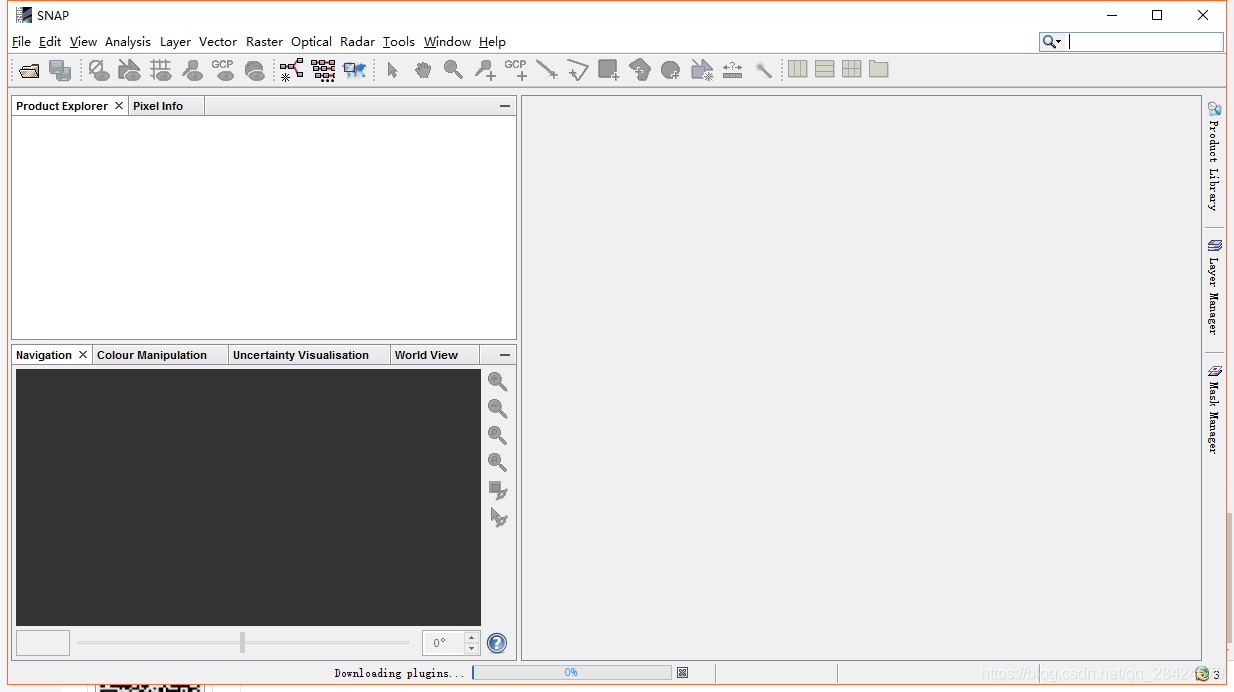
安装后可以在SNAP中将数据转为ENVI等格式输出,操作流程为打开SNAP,点击file-open product,选择需要转格式输出的数据.safe文件,选择MTD开头的.xml文件。
打开后不能直接用file-export-ENVI进行转换,这样做会弹出错误信息:
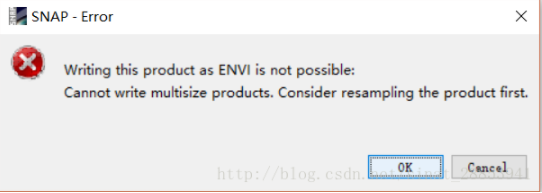
应当首先进行resampling。点击raster- geometric operations- resampling,选择resampling parameters,调节参数,点击run。
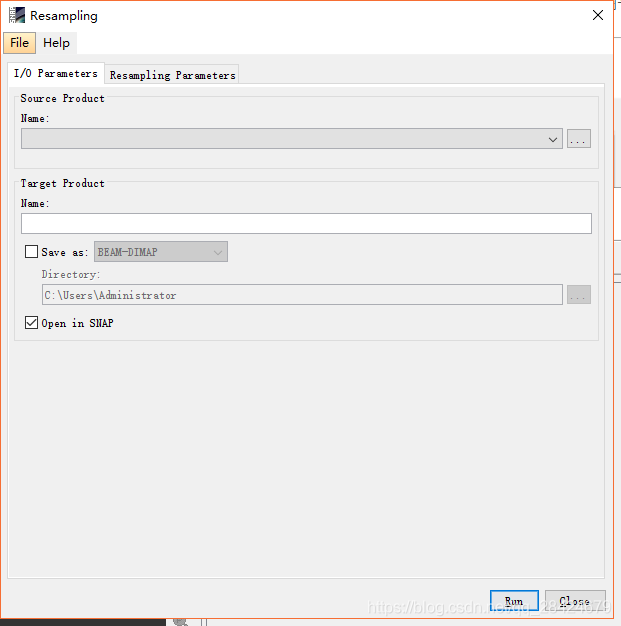
完成后SNAP左侧会出现操作完成后的结果。选中它再点击file - export- ENVI即可完成。转出后的格式可以用ENVI打开。
切记!切记!!!
情况缓冲在系统盘中的数据
记住一定要及时情清空文件中的缓冲数据,太占用内存了,如下是路径
C:\Users\Administrator\.snap\var\cache\s2tbx\l2a-reader\7.0.0
把里面新生产的产物删除即可。这个bagel不知道为什么欧空局不纠正。
补充(转换成ENVI格式)
ENVI5.1无法直接打开Sentinel数据,但大家对ENVI操作会更加熟练,这里补充说明下如何用ENVI5.1打开Sentinel数据,主要就是重采样并转换格式。
这里建议以10m重采样。若以B1波段重采样的话,结果所有波段都会为60m分辨率,数据质量会下降。而设置为10m或者以B2波段重采样,结果波段的空间分辨率变为10m,这对于非10m分辨率的波段,虽然分辨率提高了,但实质并无变化。
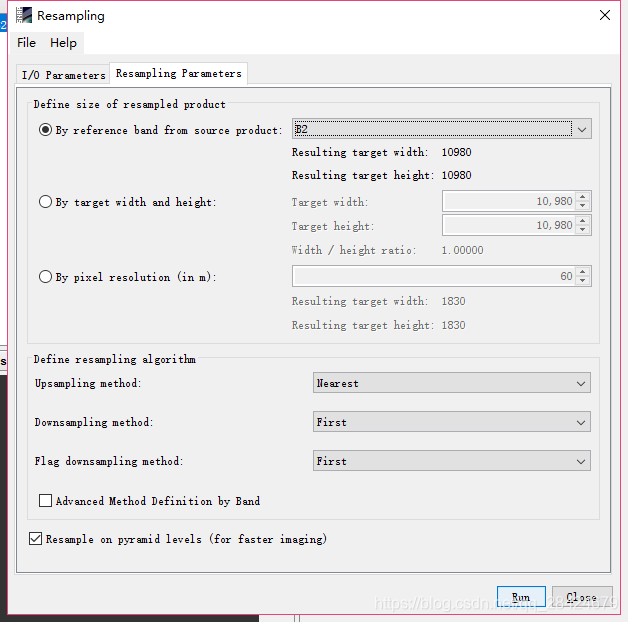
重采样后的结果就可以导入ENVI5.1中显示了,但其存储方式是一个波段一个文件,在ENVI中融合一下(ENVI中搜索layer stacking工具)就可以得到多波段文件了。
 GitHub 加速计划 / sentine / Sentinel
 48
48
 7
下载
7
下载

AtomGit 是由开放原子开源基金会联合 CSDN 等生态伙伴共同推出的新一代开源与人工智能协作平台。平台坚持“开放、中立、公益”的理念,把代码托管、模型共享、数据集托管、智能体开发体验和算力服务整合在一起,为开发者提供从开发、训练到部署的一站式体验。
更多推荐


 6
6 0
0- 0


 已为社区贡献2条内容

所有评论(0)