关于OpenCV无法putText汉字的坑
opencv
OpenCV: 开源计算机视觉库
项目地址:https://gitcode.com/gh_mirrors/opencv31/opencv
 免费下载资源
·
关于OpenCV无法在图片中写入汉字,网上很多文章,大多数是教你如何利用freetype2这个库写入汉字,本人试了一下,在ubuntu上效果不好,写入汉字时空格成了方格,而且汉字之间必须要隔个空格才能完整显示出来,否则总会漏字。如下图
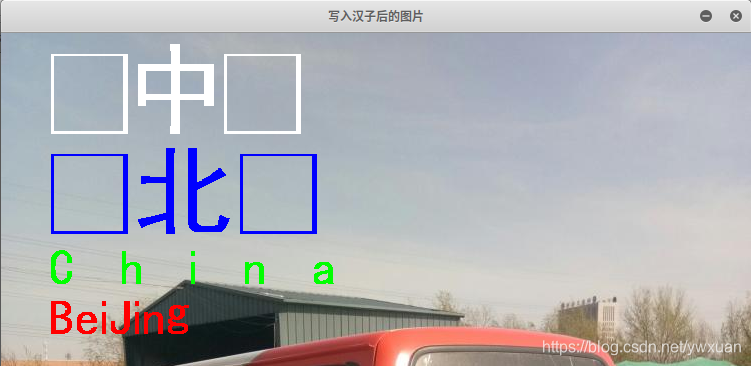
我看了源码,是将字符串转换成unicode的编码,再通过freetype2中的FT_Get_Char_Index函数获取字符的索引。但是Linux下使用的是utf-8编码,问题应该就出在这里。
其实在OpenCV 3.2以后,已经集成了freetype库,写入中文其实有更简单的方法,直接调用OpenCV中的freetype就可以了,使用非常简单,代码如下:
#include <opencv2/core/core.hpp>
#include<opencv2/freetype.hpp>
#include <opencv2/imgproc/imgproc.hpp>
#include <opencv2/highgui/highgui.hpp>

#include<iostream>
#include <string>
using namespace std;

int main()
{
	cv::Mat img=cv::imread("/home/图片/Plates/abc.jpg");

	string text="这次肯定能Put上中文!";

	int fontHeight=60;
	int thickness=-1;
	int linestyle=8;
	int baseline=0;

	cv::Ptr<cv::freetype::FreeType2> ft2;
	ft2=cv::freetype::createFreeType2();
	ft2->loadFontData("/usr/share/fonts/winFonts/simkai.ttf",0);

	cv::Size textSize=ft2->getTextSize(text,fontHeight,thickness,&baseline);

	if (thickness>0) baseline+=thickness;

	// center the text
	cv::Point textOrg((img.cols - textSize.width) / 2,
              (img.rows + textSize.height) / 2);
	// draw the box
	cv::rectangle(img, textOrg + cv::Point(0, baseline),
          textOrg + cv::Point(textSize.width, -textSize.height),
          cv::Scalar(0,255,0),1,8);
	// ... and the baseline first
	cv::line(img, textOrg + cv::Point(0, thickness),
     textOrg + cv::Point(textSize.width, thickness),
     cv::Scalar(0, 0, 255),1,8);
	// then put the text itself
	ft2->putText(img, text, textOrg, fontHeight,
             cv::Scalar(255,0,0), thickness, linestyle, true );

	cv::imshow("效果",img);
	if (cv::waitKey(0)==27) return 0;
}
效果图:

 GitHub 加速计划 / opencv31 / opencv
 236
236
 21
下载
21
下载
OpenCV: 开源计算机视觉库
最近提交(Master分支:3 个月前 )
40ab4110
Fixed stack-use-after-scope errors in charuco detector 1 天前
b2042a61
docs(core): update Universal Intrinsics for VLA (RVV/SVE) and v4.11+ API changes 1 天前

AtomGit 是由开放原子开源基金会联合 CSDN 等生态伙伴共同推出的新一代开源与人工智能协作平台。平台坚持“开放、中立、公益”的理念,把代码托管、模型共享、数据集托管、智能体开发体验和算力服务整合在一起,为开发者提供从开发、训练到部署的一站式体验。
更多推荐



 12
12 0
0- 0


 已为社区贡献1条内容

所有评论(0)