VUE2——three.js模型渲染
·
vue2项目——模型渲染——模型切换——点击特定物体物体发光
依赖安装
-
three
-
three-gltf-loader
-
three-orbitcontrols
-
package.json文件

"three": "^0.161.0",
"three-gltf-loader": "^1.111.0",
"three-orbitcontrols": "^2.110.3",
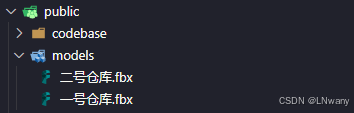
模型文件放入项目
页面布局/样式
<template>
  <div class="model-com">
    <!--画布的容器-->
    <div id="container" class="container"></div>
    <!--切换盒子-->
    <div class="toggle-div">
      <el-button
        type="info"
        v-for="item in modelList"
        :class="[item.modelUrl == cuModel.modelUrl ? 'thisButs' : 'buts']"
        :key="item.modelUrl"
        @click="toggleModel(item)"
        v-loading.fullscreen.lock="isLoading"
        :element-loading-text="loadingText"
        element-loading-spinner="el-icon-loading"
        element-loading-background="rgba(0, 0, 0, 0.8)"
      >
        {{ item.text }}
      </el-button>
    </div>
  </div>
</template>


<style scoped lang="scss">
.model-com {
  height: 100%;
  width: 100%;

  #container {
    height: 100%;
    width: 100%;
  }

  .toggle-div {
    position: absolute;
    left: 50%;
    transform: translateX(-50%);
    top: 0px;
    margin: 0px 0px 30px 0px;
    color: #fff;
    display: flex;
    .buts,
    .thisButs {
      cursor: pointer;
      display: block;
      color: #fff;
      margin: 20px;
      padding: 10px 40px;
      box-shadow: 0px 0px 5px black;

      &:hover {
        color: #ffffff;
        box-shadow: 5px 5px 10px black;
        background-color: #314785;
      }
    }

    .thisButs {
      color: #ffffff;
      box-shadow: 5px 5px 10px black;
      background-color: #314785;
    }
  }
}
</style>
vue页面引入依赖
import * as THREE from "three";
//鼠标控制器
import { OrbitControls } from "three/examples/jsm/controls/OrbitControls";
//模型加载器
import { GLTFLoader } from "three/examples/jsm/loaders/GLTFLoader.js";
//模型加载器
import { FBXLoader } from "three/examples/jsm/loaders/FBXLoader.js";
//动画
import { AnimationMixer } from "three/src/animation/AnimationMixer.js";
Data定义变量
  data() {
    return {
      // 加载状态
      isLoading: false,
      // 加载提示文本
      loadingText: null,
      //模型列表
      modelList: [
        {
          modelUrl: "models/一号仓库.fbx", //模型路径
          text: "一号仓库", //名称
          cameraPar: [60, 0.01, 500, 0, 1.5, 1], //前三位为相机参数,后三位为相机位置
          modePar: [0, 0, 0, 0.0001, 0.0001, 0.0001], //前三位为模型位置,后三位为模型缩放
          shelvesList: {
            //物体名称:后端数据对应货架号
            obj_4162: "S1-Ⅰ-01"
          }
        },
        {
          modelUrl: "models/二号仓库.fbx",
          text: "二号仓库",
          cameraPar: [60, 0.01, 500, 0, 1.5, 1], //前三位为相机参数,后三位为相机位置
          modePar: [0, 0, 0, 0.0001, 0.0001, 0.0001], //前三位为模型位置,后三位为模型缩放
          shelvesList: {
            //物体名称:后端数据对应货架号
            obj_4162: "S1-Ⅰ-01"
          }
        }
      ],
      scene: null, //场景
      model: null, //当前模型
      cuModel: "", //当前模型名称
      modelChildrenList: [], //当前模型的所有物体列表
      camera: null, //相机
      renderer: null, //渲染器
      mouseControls: null, //轨道控制
      pointLight: null, //点光源
      ambientLight: null, //环境光
      requestAnimationFrame: null, //动画循环
      raycaster: null, //射线投射器
      glowMaterialBlue: null, //发光材质(蓝色)
      glowMaterialGreen: null, //发光材质(绿色)
      previousSelectedObject: null, //当前发光的物资
      // 当前货架列表
      shelvesList: {}
    };
  },
初始化场景
    //初始化场景
    init(item) {
      this.scene = new THREE.Scene(); //新建场景
      let dom = document.getElementById("container");
      let width = dom.clientWidth; //场景宽度
      let height = dom.clientHeight; //场景高度
      let k = width / height; //场景宽高比
      this.camera = new THREE.PerspectiveCamera(
        item.cameraPar[0],
        k,
        item.cameraPar[1],
        item.cameraPar[2]
      ); //透视相机
      this.camera.position.set(
        item.cameraPar[3],
        item.cameraPar[4],
        item.cameraPar[5]
      ); //设置相机位置
      //创建渲染器
      this.renderer = new THREE.WebGLRenderer({
        antialias: true, //抗锯齿
        alpha: true
      });
      this.renderer.setSize(width, height); //设置渲染区域尺寸
      document
        .getElementById("container")
        .appendChild(this.renderer.domElement); //将画布添加到container中
      //创建轨道控制
      this.createOrbitControls();
      //创建光源
      this.createLight();
      //加载模型
      this.loadModel(item);
      // 点击模型逻辑
      this.createRaycaster();
      // 循环渲染
      this.repeatRender();
    },
创建模型点击方法
    // 创建模型点击方法
    createRaycaster() {
      const this_ = this;
      // 创建射线投射器
      this.raycaster = new THREE.Raycaster();
      // 创建发光材质蓝色
      this.glowMaterialBlue = new THREE.MeshBasicMaterial({
        color: 0xff7f4c,
        transparent: true,
        opacity: 0.3
      });
      // 创建发光材质深色
      this.glowMaterialGreen = new THREE.MeshBasicMaterial({
        color: 0x0008ff,
        transparent: true,
        opacity: 0.5
      });

      // 监听点击事件
      window.addEventListener("click", this.onClickModel, false);
    },
模型点击触发
    // 模型点击触发
    onClickModel(event) {
      // 计算鼠标点击位置在屏幕上的坐标
      const mouse = new THREE.Vector2();
      const rect = this.renderer.domElement.getBoundingClientRect();
      mouse.x = ((event.clientX - rect.left) / rect.width) * 2 - 1;
      mouse.y = (-(event.clientY - rect.top) / rect.height) * 2 + 1;
      // 更新射线投射器的位置和方向
      this.raycaster.setFromCamera(mouse, this.camera);
      // 检测射线和场景中的物体相交,获取射线中的所有物体
      const intersects = this.raycaster.intersectObjects(
        this.scene.children,
        true
      );
      if (intersects.length > 0) {
        // clickedObject是点击到的第一个物体
        const clickedObject = intersects[0].object;
        // 调用点击物体发光的方法,参数:(点击的物体,发光材质)
        this.modeClickLuminous(clickedObject, this.glowMaterialBlue);
      } else {
        // 点击到了空白处,取消当前选中物体的发光效果
        if (this.previousSelectedObject) {
          this.scene.remove(this.previousSelectedObject);
          this.previousSelectedObject = null;
        }
      }
    },
点击物体后处理逻辑
    // 模型点击后处理物体逻辑
    modeClickLuminous(clickedObject, glowMaterial) {
      if (this.shelvesList[clickedObject.name]) {
        // 取消之前物体的发光效果
        this.scene.remove(this.previousSelectedObject);
        // 创建发光轮廓(复制选中物体并应用发光材质)
        const outline = clickedObject.clone();
        outline.material = glowMaterial;
        // 添加发光轮廓到场景中
        this.scene.add(outline);
        // 更新前一个选中物体
        this.previousSelectedObject = outline;
      }
    },
创建轨道控制
    //创建轨道控制
    createOrbitControls() {
      //创建控件对象
      this.mouseControls = new OrbitControls(
        this.camera,
        this.renderer.domElement
      );
      this.mouseControls.autoRotate = false; // 自动旋转
      this.mouseControls.enableDamping = true; // 鼠标阻尼效果
      this.mouseControls.dampingFactor = 0.05; // 鼠标阻尼系数
      this.mouseControls.rotateSpeed = 0.5; // 旋转速度
      this.mouseControls.zoomSpeed = 1.2; // 缩放速度
      this.mouseControls.enablePan = true; // 禁用平移
    },
创建光源
    //创建光源
    createLight() {
      let lightColor = new THREE.Color(0xffffff);
      let ambient = new THREE.AmbientLight(lightColor); //环境光
      ambient.name = "环境光";
      this.scene.add(ambient);
      let directionalLight1 = new THREE.DirectionalLight(lightColor);
      directionalLight1.position.set(0, 0, 500);
      this.scene.add(directionalLight1); //平行光源添加到场景中
      let directionalLight2 = new THREE.DirectionalLight(lightColor);
      directionalLight2.position.set(0, 0, -500);
      this.scene.add(directionalLight2); //平行光源添加到场景中
      let directionalLight3 = new THREE.DirectionalLight(lightColor);
      directionalLight3.position.set(500, 0, 0);
      this.scene.add(directionalLight3); //平行光源添加到场景中
      let directionalLight4 = new THREE.DirectionalLight(lightColor);
      directionalLight4.position.set(-500, 0, 0);
      this.scene.add(directionalLight4); //平行光源添加到场景中
      let directionalLight5 = new THREE.DirectionalLight(lightColor);
      directionalLight5.position.set(0, 500, 0);
      this.scene.add(directionalLight5); //平行光源添加到场景中
      let directionalLight6 = new THREE.DirectionalLight(lightColor);
      directionalLight6.position.set(0, -500, 0);
      this.scene.add(directionalLight6); //平行光源添加到场景中
    },
模型加载
    //加载模型
    loadModel(item) {
      const loader = new FBXLoader();
      loader.load(
        item.modelUrl,
        // 加载成功函数
        model => {
          console.log(model);
          this.model = model;
          // 模型位置定义
          model.position.set(item.modePar[0], item.modePar[1], item.modePar[2]);
          // 在场景中添加模型
          this.scene.add(model);
          // 获取所有模型物体列表
          this.modelChildrenList = model.children;
          // 调用接口获取初始发货物体
          this.getPlanList();
          this.scene.scale.set(
            item.modePar[3],
            item.modePar[4],
            item.modePar[5]
          );
          this.isLoading = false; //关闭加载框
        },
        // 加载过程中
        xhr => {
          // 获取加载的百分比进度
          const percent = xhr.loaded / xhr.total;
          var percentage = (percent * 100).toFixed(2) + "%";
          // 加载进度赋值
          this.loadingText = percentage;
        },
        // 加载错误
        error => {
          console.log("模型加载失败", error);
          this.isLoading = false; //关闭加载框
        }
      );
    },
调用接口获取初始发货物体
    // 货架根据物资添加材质颜色
    getPlanList(taskId) {
      this.$axios.get("/apis/list").then(res => {
        // 获取所有货架EPC,去重
        const tablePlanData = res.data.data;
        if (tablePlanData.length < 1) {
          return;
        }
        // 获取与货架对应的模型名称
        var result = tablePlanData.reduce((acc, value) => {
          Object.entries(this.shelvesList).forEach(([key, val]) => {
            if (val === value) {
              acc.push(key);
            }
          });
          return acc;
        }, []);

        // 根据名称获取模型对象
        const planModelList = this.modelChildrenList.filter(item =>
          result.includes(item.name)
        );

        // 模型添加发光材质
        this.selectPlanModelListTwo = [];
        planModelList.forEach(item => {
          // 创建发光轮廓(复制选中物体并应用发光材质)
          const outline = item.clone();
          outline.material = this.glowMaterialBlue;
          // 添加发光轮廓到场景中
          this.scene.add(outline);
          // // 更新前一个选中物体
          this.selectPlanModelListTwo.push(outline);
        });
      });
    },
循环渲染
    //重复渲染
    repeatRender() {
      //动画循环
      this.requestAnimationFrame = requestAnimationFrame(this.repeatRender);
      //实时更新轨道控制
      this.mouseControls.update();
      //将场景和相机进行渲染
      this.renderer.render(this.scene, this.camera);
    }
销毁场景
    //销毁场景
    destroyCom() {
      // 取消动画帧请求
      cancelAnimationFrame(this.requestAnimationFrame);
      // 强制释放WebGL上下文
      this.renderer.forceContextLoss();
      // 释放渲染器资源
      this.renderer.dispose();
      // 清空场景
      this.scene.clear();
      // 释放场景资源
      this.scene = null;
      // 释放相机资源
      this.camera = null;
      // 释放鼠标控制资源
      this.mouseControls = null;
      // 清空容器内的内容
      document.getElementById("container").innerHTML = null;
      // 释放渲染器资源
      this.renderer = null;
    },
模型切换
    //点击切换按钮
    async toggleModel(item) {
      this.isLoading = true; //打开加载框
      if (this.camera) {
        //如果上一次存在场景则清除
        await this.destroyCom();
      }
      this.cuModel = item;
      this.shelvesList = item.shelvesList;
      this.init(item); //初始化场景
    },
AtomGit 是由开放原子开源基金会联合 CSDN 等生态伙伴共同推出的新一代开源与人工智能协作平台。平台坚持“开放、中立、公益”的理念,把代码托管、模型共享、数据集托管、智能体开发体验和算力服务整合在一起,为开发者提供从开发、训练到部署的一站式体验。
更多推荐


 9
9 0
0- 0


 已为社区贡献1条内容

所有评论(0)