已安装nvidia 显卡驱动时,cuda 安装
·
1.cuda下载和安装参照
Linux安装CUDA的正确姿势_FlyWine的博客-CSDN博客_linux cuda
2.安装时,enter continue 出现以下问题
Existing package manager installation of the driver found. It is strongly
表示已经存在了一个显卡驱动,与将要自动安装的驱动冲突。
这里的X表示 execute,安装的意思
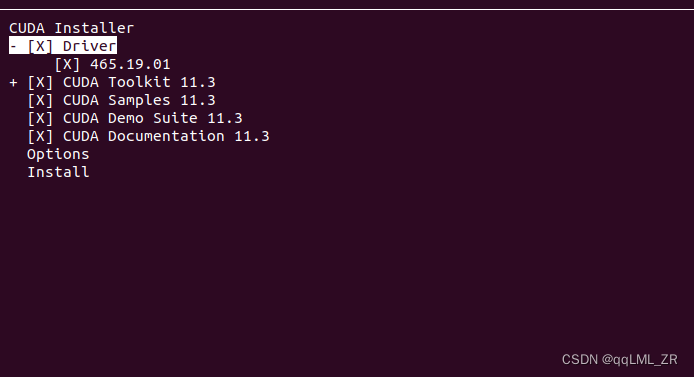
光标移动到driver,选择不安装
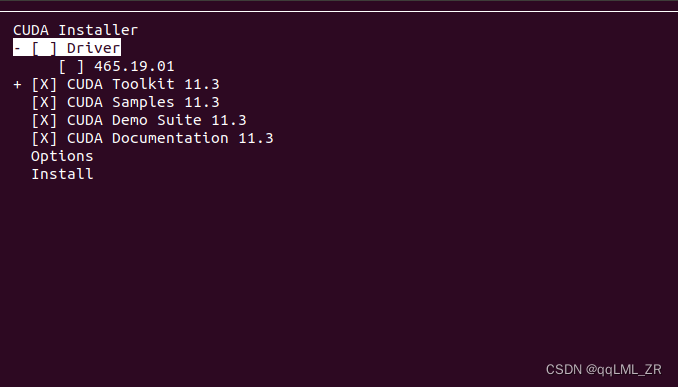
Install enter
安装完成后输出以下信息,可以看到未安装driver,只安装了Toolkit 和Samlples
===========
= Summary =
===========

Driver:   Not Selected
Toolkit:  Installed in /usr/local/cuda-11.3/
Samples:  Installed in /home/c415/

Please make sure that
 -   PATH includes /usr/local/cuda-11.3/bin
 -   LD_LIBRARY_PATH includes /usr/local/cuda-11.3/lib64, or, add /usr/local/cuda-11.3/lib64 to /etc/ld.so.conf and run ldconfig as root

To uninstall the CUDA Toolkit, run cuda-uninstaller in /usr/local/cuda-11.3/bin
***WARNING: Incomplete installation! This installation did not install the CUDA Driver. A driver of version at least 465.00 is required for CUDA 11.3 functionality to work.
To install the driver using this installer, run the following command, replacing <CudaInstaller> with the name of this run file:
    sudo <CudaInstaller>.run --silent --driver

Logfile is /var/log/cuda-installer.log

AtomGit 是由开放原子开源基金会联合 CSDN 等生态伙伴共同推出的新一代开源与人工智能协作平台。平台坚持“开放、中立、公益”的理念,把代码托管、模型共享、数据集托管、智能体开发体验和算力服务整合在一起,为开发者提供从开发、训练到部署的一站式体验。
更多推荐


 4
4 0
0- 0


 已为社区贡献2条内容

所有评论(0)