.net core发布到IIS上出现 HTTP Error 500.31 - Failed to load ASP.NET Core runtime
·
错误提示:
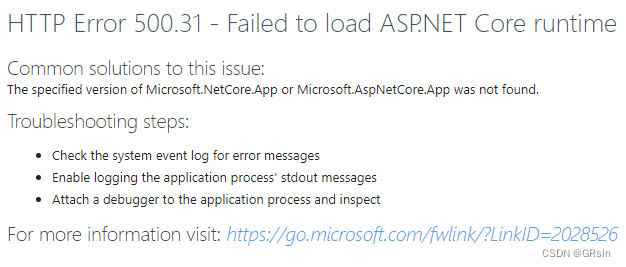
HTTP Error 500.31 - Failed to load ASP.NET Core runtime
Common solutions to this issue:
The specified version of Microsoft.NetCore.App or Microsoft.AspNetCore.App was not found.
Troubleshooting steps:
- Check the system event log for error messages
- Enable logging the application process' stdout messages
- Attach a debugger to the application process and inspect
For more information visit: Troubleshoot ASP.NET Core on Azure App Service and IIS | Microsoft Learn
解决方法:
事件查看器>Windows日志>应用程序(Appliction),查看错误日志
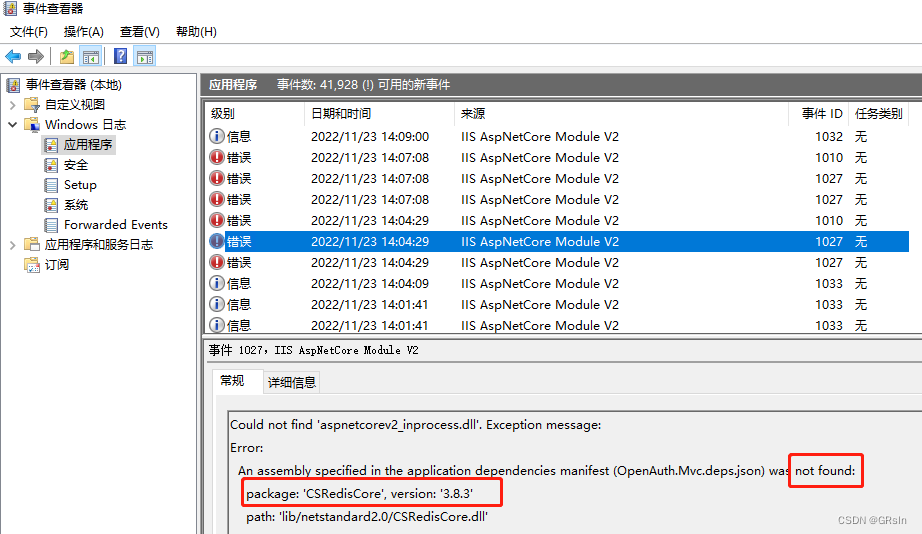
排查错误日志发现,缺少了 一个redis的dll库,复制过去就可以了~
(事件查看器打开方法:
1、点击“开始→运行”,输入eventvwr,点击“确定”,就可以打开事件查看器。
2、单击“开始”-“设置”-“控制面板”-“管理工具”-“事件查看器”。
3、win10界面样式,可右键开始菜单-“事件查看器”。)

AtomGit 是由开放原子开源基金会联合 CSDN 等生态伙伴共同推出的新一代开源与人工智能协作平台。平台坚持“开放、中立、公益”的理念,把代码托管、模型共享、数据集托管、智能体开发体验和算力服务整合在一起,为开发者提供从开发、训练到部署的一站式体验。
更多推荐


 1
1 0
0- 0


 已为社区贡献2条内容

所有评论(0)