简单的HTML登录界面(带源码)
·
静态页面
非常的简单,第一眼看到这个界面的时候就感觉非常的喜欢,给我一种简约又美观的感觉,然后就模仿样式自己写出来了,给大家分享一下
还写了一个注册页面大部分的代码都差不多,因为它们实在太像了,我太喜欢了。
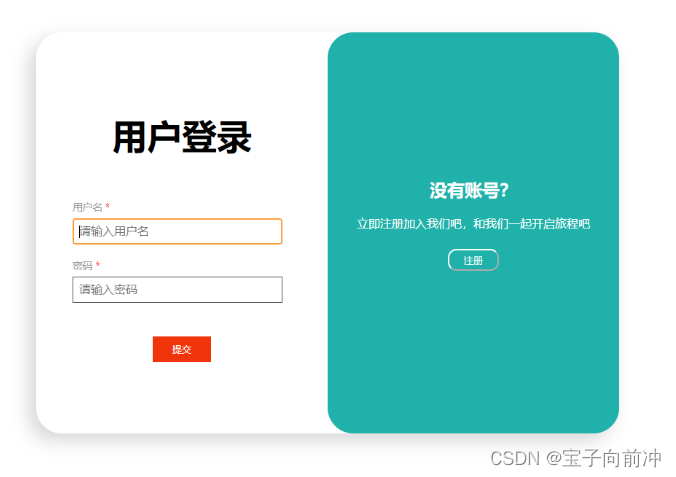
<!DOCTYPE html>
<html lang="en">
  <head>
    <meta charset="UTF-8" />
    <meta http-equiv="X-UA-Compatible" content="IE=edge" />
    <meta name="viewport" content="width=device-width, initial-scale=1.0" />
    <title>Document</title>
    <!-- <link rel="stylesheet" href="text.css" /> -->
  </head>
  <style>
    .all {
      width: 800px;
      box-shadow: -10px 10px 25px rgba(210, 210, 210, 0.9);
      margin: auto;
      margin-top: 5%;
      display: flex;
      border-radius: 35px;
      background-color: #ffffff;
      height: 550px;
    }
    .log {
      width: 50%;
      margin: auto;
    }
    .reg {
      width: 50%;
      height: 100%;
      margin: auto;
      background-color: #20b2aa;
      border-radius: 35px;
      color: #ffffff;
    }
    .reg_1 {
      text-align: center;
      margin: auto;
      margin-top: 50%;
    }
    .reg_1 h2 {
      font-weight: 700;
    }
    .reg_1 p {
      margin: 15px 0px 25px 0px;
    }
    .sig {
      width: 70px;
      height: 30px;
      border-radius: 12px;
      background-color: #20b2aa;
      border-color: #fff;
      color: #ffffff;
    }
    #tiao {
      padding: 0em 0;
    }
    .reg_1 a {
      color: #ffffff;
    }
    h3 {
      font-size: 3em;
      color: black;
      padding-bottom: 1em;
      margin: 0;
      text-align: center;
      font-family: "Marvel-Regular";
    }
    .input {
      margin: 10px 50px;
      width: 300px;
      height: 70px;
    }
    span {
      color: #999;
      font-size: 0.85em;
      padding-bottom: 0.2em;
      display: block;
      text-transform: uppercase;
      margin-bottom: 4px;
    }
    .input-text {
      border: 1px solid #555;
      outline-color: #fd9f3e;
      width: 90%;
      font-size: 1em;
      padding: 0.5em;
      line-height: inherit;
    }
    .register-top-grid {
      color: black;
      padding-bottom: 1em;
      margin: 0;
      font-family: "Marvel-Regular";
      margin: 10px 0;
    }
    .text-center {
      text-align: center;
    }
    .tijiao {
      color: rgb(255, 253, 253);
      width: 80px;
      height: 35px;
      background-color: rgb(241, 52, 10);
      border: none;
    }
  </style>
  <body>
    <div class="all">
      <div class="log">
        <div class="register">
          <form>
            <div class="register-top-grid">
              <h3>用户登录</h3>
              <div class="input">
                <span>用户名 <label style="color: red">* </label></span>
                <input
                  type="text"
                  v-model="name"
                  placeholder="请输入用户名"
                  class="input-text"
                />
              </div>
              <div class="input">
                <span>密码 <label style="color: red">*</label></span>
                <input
                  type="password"
                  v-model="password"
                  placeholder="请输入密码"
                  class="input-text"
                />
              </div>
            </div>
            <div class="text-center">
              <input
                type="submit"
                value="提交"
                class="tijiao"
                @click="denglu"
              />
            </div>
          </form>
        </div>
      </div>
      <div class="reg">
        <div class="reg_1">
          <h2>没有账号?</h2>
          <p>立即注册加入我们吧,和我们一起开启旅程吧</p>
          <a href="/register.html">
            <button type="primary" class="sig">注册</button>
          </a>
        </div>
      </div>
    </div>
  </body>
</html>
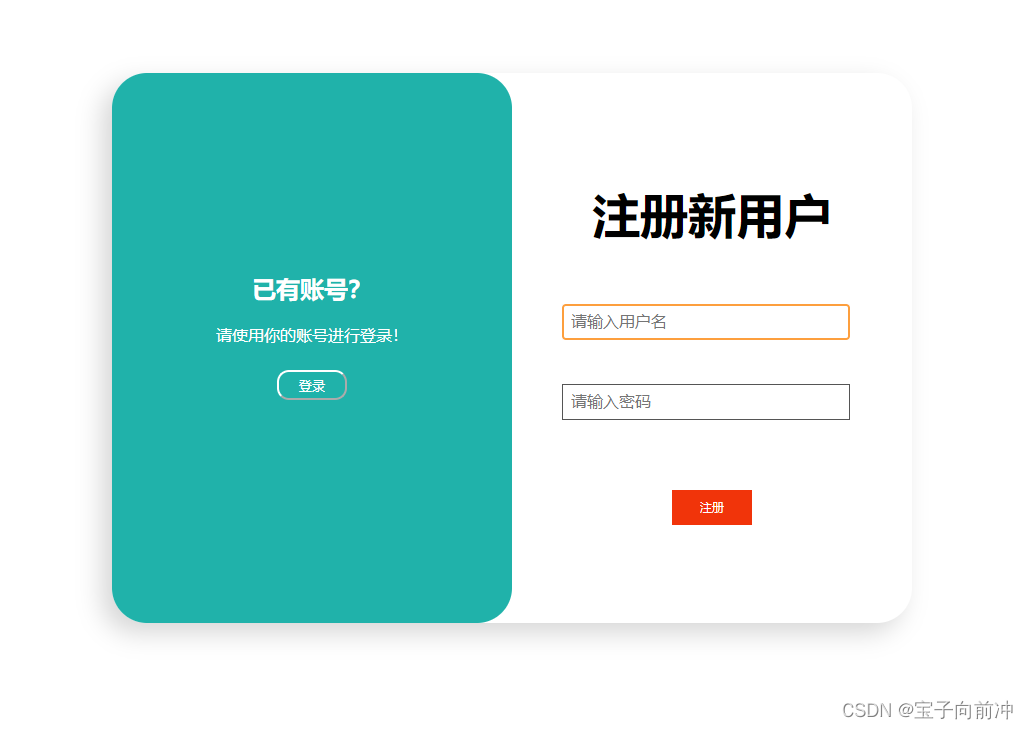
<!DOCTYPE html>
<html lang="en">
  <head>
    <meta charset="UTF-8" />
    <meta http-equiv="X-UA-Compatible" content="IE=edge" />
    <meta name="viewport" content="width=device-width, initial-scale=1.0" />
    <title>Document</title>
    <!-- <link rel="stylesheet" href="text.css" /> -->
  </head>
  <style>
    .all {
      width: 800px;
      box-shadow: -10px 10px 25px rgba(210, 210, 210, 0.9);
      margin: auto;
      margin-top: 5%;
      display: flex;
      border-radius: 35px;
      background-color: #ffffff;
      height: 550px;
    }
    .log {
      width: 50%;
      margin: auto;
    }
    .reg {
      width: 50%;
      height: 100%;
      margin: auto;
      background-color: #20b2aa;
      border-radius: 35px;
      color: #ffffff;
    }
    .reg_1 {
      text-align: center;
      margin: auto;
      margin-top: 50%;
    }
    .reg_1 h2 {
      font-weight: 700;
    }
    .reg_1 p {
      margin: 15px 0px 25px 0px;
    }
    .sig {
      width: 70px;
      height: 30px;
      border-radius: 12px;
      background-color: #20b2aa;
      border-color: #fff;
      color: #ffffff;
    }
    #tiao {
      padding: 0em 0;
    }
    .reg_1 a {
      color: #ffffff;
    }
    h3 {
      font-size: 3em;
      color: black;
      padding-bottom: 1em;
      margin: 0;
      text-align: center;
      font-family: "Marvel-Regular";
    }
    .input {
      margin: 10px 50px;
      width: 300px;
      height: 70px;
    }
    span {
      color: #999;
      font-size: 0.85em;
      padding-bottom: 0.2em;
      display: block;
      text-transform: uppercase;
      margin-bottom: 4px;
    }
    .ll {
      border: 1px solid #555;
      outline-color: #fd9f3e;
      width: 90%;
      font-size: 1em;
      padding: 0.5em;
      line-height: inherit;
    }
    .register-top-grid {
      color: black;
      padding-bottom: 1em;
      margin: 0;
      /* text-align: center; */
      font-family: "Marvel-Regular";
      margin: 10px 0;
    }
    .text-center {
      text-align: center;
    }
    .zhuce {
      border: none;
      font-size: 10px;
      color: rgb(255, 253, 253);
      width: 80px;
      height: 35px;
      background-color: rgb(241, 52, 10);
    }
  </style>
  <body>
    <div class="all">
      <div class="reg">
        <div class="reg_1">
          <h2>已有账号?</h2>
          <p>请使用你的账号进行登录!</p>
          <a href="/login.html">
            <button type="button" class="sig">登录</button>
          </a>
        </div>
      </div>
      <div class="log">
        <div>
          <div class="register" id="tiao">
            <form>
              <div class="register-top-grid">
                <h3>注册新用户</h3>
                <div class="input">
                  <input
                    class="ll"
                    type="text"
                    placeholder="请输入用户名"
                    v-model="name"
                  />
                </div>
                <div class="input">
                  <input
                    class="ll"
                    type="password"
                    placeholder="请输入密码"
                    v-model="password"
                  />
                </div>
                <div class="clearfix"></div>
              </div>
              <div class="text-center">
                <input
                  type="submit"
                  value="注册"
                  class="zhuce"
                />
              </div>
            </form>
          </div>
        </div>
      </div>
    </div>
  </body>
</html>
补充
因为有一些小伙伴可能不知道怎么添加 超链接<a></a>跳转,所以我进行了一些更正,已经把超链接补充到代码中了,现在需要做的就是分别建立 login.html 和 register.html 将代码放入其中。
注意:这两个html文件要放到同一个文件哦,因为我跳转时用的是相对路径,如果不放到同一个文件夹里的话,需要修改超链接里面的路径。

AtomGit 是由开放原子开源基金会联合 CSDN 等生态伙伴共同推出的新一代开源与人工智能协作平台。平台坚持“开放、中立、公益”的理念,把代码托管、模型共享、数据集托管、智能体开发体验和算力服务整合在一起,为开发者提供从开发、训练到部署的一站式体验。
更多推荐


 92
92 0
0- 0


 已为社区贡献4条内容

所有评论(0)