ios中间大,两边小的轮播图
首先上图 , 中间大,两边小的轮播图 ,git地址 : https://github.com/guochaoshun/LunBoTu
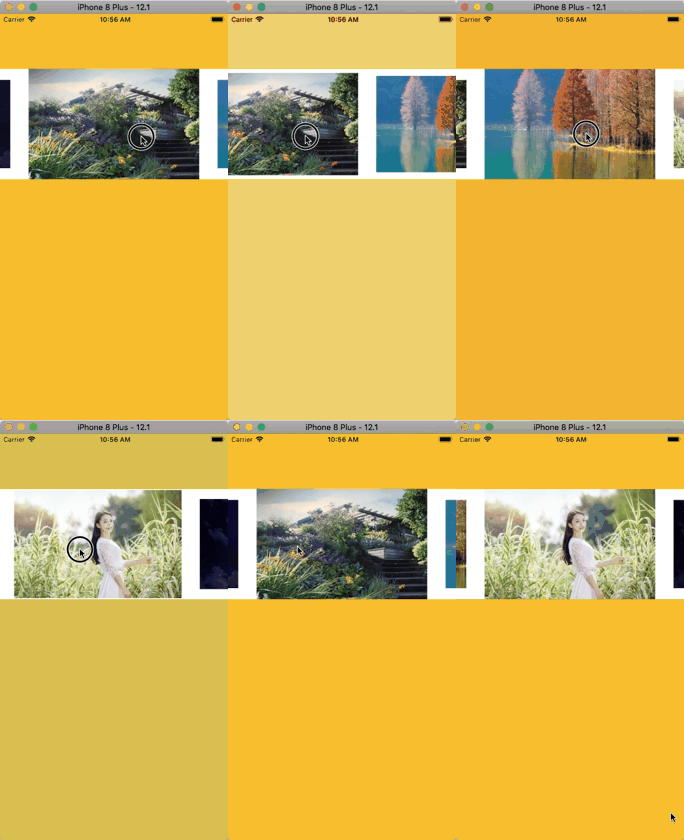
主要参考代码 : https://github.com/orzzh/WLScrollView , 这个是用scrollview做的,然后自己写的cell复用,觉得有点复杂了,所以我的例子直接用了UICollectionView
里面有几个比较好的点 :
1. 对timer的使用 , _timer加入的是NSDefaultRunLoopMode,没有加入NSEventTrackingRunLoopMode,所以拖动的时候不需要在停止timer
- (void)setTimerInterval:(CGFloat)timerInterval {
    _timerInterval = timerInterval;
    if (timerInterval <= 0) {
        [_timer invalidate];
        _timer = nil;
        return;
    }
    __weak typeof(self) weakSelf = self;
    _timer = [NSTimer timerWithTimeInterval:timerInterval repeats:YES block:^(NSTimer * _Nonnull timer) {

        /*业务代码*/
    }];
    [_timer fire];
    // _timer加入的是NSDefaultRunLoopMode,没有加入NSEventTrackingRunLoopMode,所以拖动的时候不需要在停止timer
    [[NSRunLoop currentRunLoop] addTimer:_timer forMode:NSDefaultRunLoopMode];


}
2. 手机松开的时候想要立即停止滚动. 重写scrollViewWillEndDragging方法 , 设置targetContentOffset之后就不会有惯性减速了, 对了 , 还有这个属性 _colloectView.decelerationRate = UIScrollViewDecelerationRateFast; 这样设置减速会很快,降低惯性值
- (void)scrollViewWillBeginDragging:(UIScrollView *)scrollView {
    _startX = scrollView.contentOffset.x;
}
- (void)scrollViewWillEndDragging:(UIScrollView *)scrollView
                     withVelocity:(CGPoint)velocity
              targetContentOffset:(inout CGPoint *)targetContentOffset{
    // 设置targetContentOffset之后就不会有惯性减速了
    *targetContentOffset = scrollView.contentOffset;
    _endX = scrollView.contentOffset.x;
    [self scrollToIndex];

}
3.动画的实现部分 , 根据距离屏幕中心的偏移距离 , 然后计算出对应的放大倍数 , CGFloat scale = 1-0.1*d ; 这个可以根据需要自行调整
- (void)scrollViewDidScroll:(UIScrollView *)scrollView {

    CGFloat ScreenWidth = [UIScreen mainScreen].bounds.size.width;
    for (UICollectionViewCell * cell in self.colloectView.visibleCells) {
        CGPoint centerPoint = [self convertPoint:cell.center fromView:scrollView];

        CGFloat d = fabs(centerPoint.x - ScreenWidth*0.5)/cell.contentView.bounds.size.width;
        // 中间的为1,旁边2个为0.9
        CGFloat scale = 1-0.1*d ;
        cell.layer.transform = CATransform3DMakeScale(scale, scale, 1);


    }

}
4. 轮播的实现 , 这个采用了简单有效的方式 ,NSInteger最大可以放的元素数量是 9*10^18, 数组中可以放的元素也是10^12个 , 所以肯定不会超的
// NSInteger的取值范围是2^63-1,9 223 372 036 854 775 807大约是9*10^18,所以肯定不会超的
// 就算dataSourse里面只有一个元素,1s滑动一次,需要滑动50000次,
// 用户也需要无聊的滑动13多个小时才会滑到最右边,如果对10W还是不放心,那就改成100W
- (NSInteger)collectionView:(UICollectionView *)collectionView numberOfItemsInSection:(NSInteger)section {
    return self.dataSourse.count * 100000;
}

- (UICollectionViewCell *)collectionView:(UICollectionView *)collectionView cellForItemAtIndexPath:(NSIndexPath *)indexPath {
    MainADCell * cell = [collectionView dequeueReusableCellWithReuseIdentifier:@"MainADCell" forIndexPath:indexPath];
    cell.mainImage.image = [UIImage imageNamed:self.dataSourse[indexPath.item%self.dataSourse.count]];
    cell.tag = indexPath.item%self.dataSourse.count;
    return cell;
}

AtomGit 是由开放原子开源基金会联合 CSDN 等生态伙伴共同推出的新一代开源与人工智能协作平台。平台坚持“开放、中立、公益”的理念,把代码托管、模型共享、数据集托管、智能体开发体验和算力服务整合在一起,为开发者提供从开发、训练到部署的一站式体验。
更多推荐



 2
2 0
0- 0


 已为社区贡献3条内容

所有评论(0)