git clone 时出现 fatal: Could not read from remote repository.Please make sure you have the co...
·
今天我在用廖雪峰的方法进行git clone的时候,遇到了标题所示的问题
先给出一个简单的解决方法,用如下链接里面的命令去拷贝:
参考:Git - Getting a Git Repository
接下来,我想彻底解决它,思路如下:
1.删除本地的公钥(删除不了,权限不够)
2.新建公钥(可以覆盖原来的公钥),并在github上设置
看生成时间可知,为下面一个文件夹里面的那个:
然后用cat命令查看内容,把内容拷出来以后,去下面的地方设置:
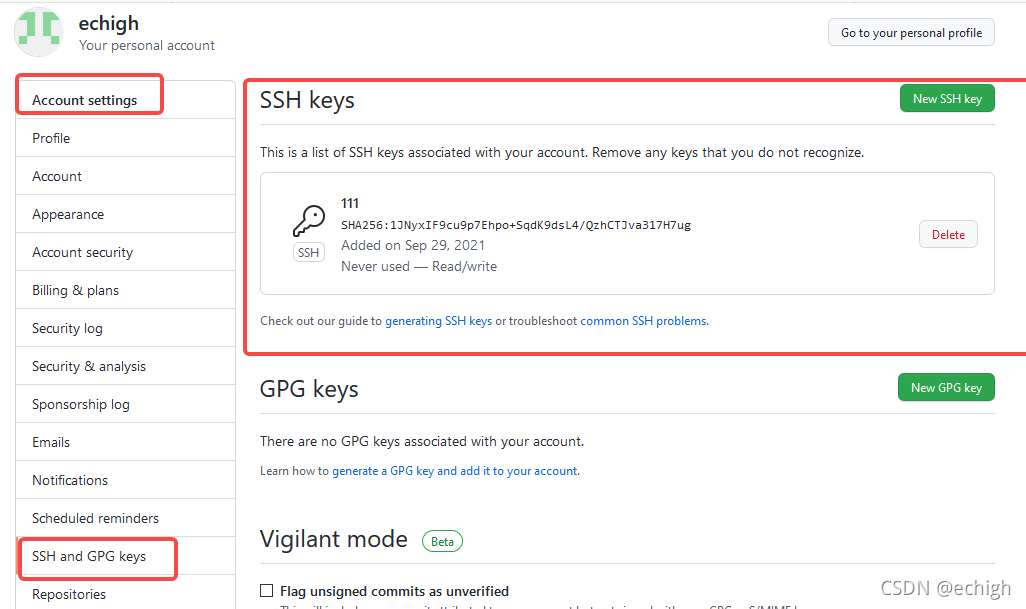
3.设置本地git用户名和邮箱
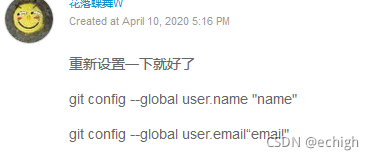
4.用廖雪峰的方法再试一次
以上,还不行,我找到了廖雪峰老师如下的回答,可能是公司限制的问题吧

5.我git push遇到同样的问题解决了,得按那个应用token的方法去做
之前遇到的需要token的记录如下:
remote: Support for password authentication was removed on August 13, 2021. Please use a personal access token instead.解决办法参考:
GitHub不再支持密码验证解决方案:SSH免密与Token登录配置 - 云+社区 - 腾讯云
有时候git push无法访问,比如下面第一次git push时候,再试一次就可以了
echigh@hcg:/mnt/e/work/project/app$ git remote add origin https://github.com/echigh/test_push.git
fatal: remote origin already exists.
echigh@hcg:/mnt/e/work/project/app$ git push -u origin temp
fatal: unable to access 'https://github.com/echigh/test_push.git/': GnuTLS recv error (-110): The TLS connection was non-properly terminated.
echigh@hcg:/mnt/e/work/project/app$ git push -u origin temp
Username for 'https://github.com': echigh
Password for 'https://echigh@github.com':
Enumerating objects: 519, done.
Counting objects: 100% (519/519), done.
Delta compression using up to 8 threads
Compressing objects: 100% (439/439), done.
Writing objects: 100% (519/519), 2.35 MiB | 407.00 KiB/s, done.
Total 519 (delta 247), reused 0 (delta 0)
remote: Resolving deltas: 100% (247/247), done.
To https://github.com/echigh/test_push.git
 * [new branch]      temp -> temp
Branch 'temp' set up to track remote branch 'temp' from 'origin'.
6.总结:
遇到
fatal: Could not read from remote repository.Please make sure you have the co和
remote: Support for password authentication was removed on August 13, 2021. Please use a personal access token instead.可能可以使用同一种方法,参考第5点
但是我虽然解决了,但是每次都要发送token验证身份,token我备份在了我的百度网盘了,非常的麻烦,等以后看看怎么免密操作

AtomGit 是由开放原子开源基金会联合 CSDN 等生态伙伴共同推出的新一代开源与人工智能协作平台。平台坚持“开放、中立、公益”的理念,把代码托管、模型共享、数据集托管、智能体开发体验和算力服务整合在一起,为开发者提供从开发、训练到部署的一站式体验。
更多推荐


 0
0 0
0- 0


 已为社区贡献2条内容

所有评论(0)